



Sales Order Software
Sales order automation software converts customer purchase orders into ERP sales orders without manual data entry. Systems differ in where the validation happens: before the record is created, or after. For one EchoVera distributor client, only 3% of 6,680 sales orders over two months needed to be reviewed.
How to evaluate sales order automation
When comparing systems, ask what percentage of orders still need to be reviewed before they are committed. Some systems automate the keystrokes, but every order still has to be reviewed and approved. Their matching improves when users correct it, which means the operator supplies the optimization work. Other systems validate and transform the data before entry, so only exceptions need to be reviewed.
The distinction determines whether you are reducing keystrokes or reducing hours.
Which applies to you
Running NetSuite — the implementation detail is here: Sales Order Automation for NetSuite →
Running a different ERP — EchoVera’s intelligent OCR and AP automation work with Infor CloudSuite / SyteLine, Sage Intacct and SAP Business One. Sales order automation is NetSuite only.
Powered by AI
Sales Order Automation provides key benefits:
- Improved customer service
- Reduce processing time and order cycle time
- Reduced days outstanding
- Speeds up the invoice to cash process
- Overall – improved customer satisfaction!

Sales Orders Arrive in Various Formats
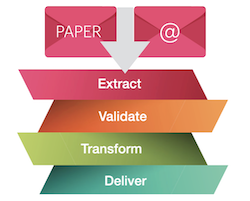
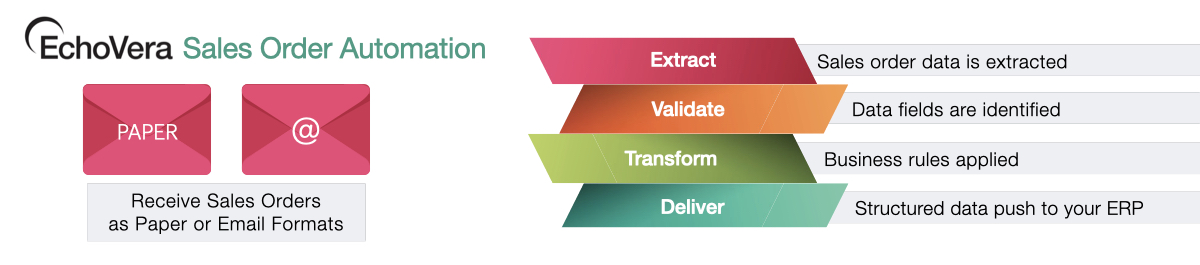
Sales orders arrive by email, fax, pfd or EDI. Sales orders are scanned and data fields mapped.
Extract Sales Order Data
Data is intuitively extracted from sales orders. Electronic files are read directly from their data.
Validate Sales Order Data
Data fields of the sales orders are identified and validated. The software intuitively picks up data from various sales order layouts.
Transform with Business Rules
Business rules and business process logic is applied to the sales order based on each unique customer.
Deliver to Your ERP
Structured sales order data is delivered into your ERP. Seamless integration.
A Complete Sales Order Solution
Sales Order Automation eliminates manual processes and optimizes the sales order process.
Integration with your ERP or Accounting System
EchoVera’s Sales Order Automation is a cloud application that integrates with any ERP or accounting system without costly integration development.
For buyers, it’s important they are not impacted by the technology related to your sales order process. There’s no need for any software or software infrastructure for the buyers who are sending in their orders.
Case Studies
EchoVera has processed over $9 billion in document dollar volume across 30+ years, serving organizations in the United States, Canada, Australia, and Europe across wholesale distribution, manufacturing, and multi-entity enterprise operations. See our case studies >
Get Started
EchoVera is a bespoke solution. Implementation begins with a review of your current purchase order intake process, document formats, and NetSuite configuration.
Seamless Integration
with your ERP or Accounting System
EchoVera’s Sales Order Automation is a cloud application that integrates with any ERP or accounting system without costly integration development.
Outstanding Service & Support
…
Contact Us:
E-mail: sales@echovera.com

EchoVera Inc. provides Intelligent OCR, Sales Order Automation and AP Automation to organizations looking to reduce costs and increase the efficiency of their financial operations. EchoVera brings over 30 years experience to clients worldwide.
Common FAQs
What is sales order automation?
Sales order automation is software that converts incoming customer purchase orders into ERP sales orders without manual data entry. The software extracts the order data, validates it against your customer and item records, applies business rules, and creates the sales order.
What is the difference between sales order automation and sales order processing automation?
The terms are used interchangeably. Sales order automation, sales order processing automation, and automated sales order processing all describe converting customer purchase orders into ERP sales orders without manual entry.
Where systems differ is not the label but the sequence. Some validate the order data before the ERP record is created. Others create the record first and correct errors afterward. That sequence determines how much manual work remains.
What are the benefits of sales order automation?
The measurable outcomes are order entry time, error rate, and order cycle time. Manual entry of a complex purchase order takes several minutes: identifying the customer, entering the PO number, selecting billing and shipping addresses, matching part numbers, entering quantities and units of measure, and applying pricing. Automation removes those steps for orders that pass validation.
- Errors change from something caught after entry to something prevented before it. An order that would have created a downstream correction — wrong part number, missing field — is held before it reaches the ERP.
- For one EchoVera distributor client, only 3% of 6,680 sales orders over two months needed to be reviewed.
How does sales order automation reduce order entry errors?
Errors enter an ERP in one of two ways: the data was wrong when it was keyed, or the data was correct but did not match what the ERP expected. Pre-entry validation addresses both before a record exists. Customer part numbers are translated to catalog item numbers. Required fields are checked for completeness. Addresses are matched to the correct ship-to location.
- An order that fails any of these checks is held as an exception. An order that passes is created complete.
- The alternative is correcting the record after it exists, which requires finding it first.
How does sales order automation work for high-volume distributors?
Volume changes which problems matter. At a few orders a day, manual entry is a task. At 2,000 or more complex purchase orders a month, it becomes a staffing dependency. High-volume distributors typically carry three conditions that generic automation handles poorly:
- Customer-specific part numbers that do not match the catalog
- Unit-of-measure differences between how the customer orders and how the item is stocked
- Multi-location or parent-child customer structures that determine where the order ships and who is billed
Each of these is a translation problem, not an extraction problem. Reading the document is the straightforward part. Mapping what the document says to what your ERP requires is where order entry time is actually spent.
What percentage of orders should require manual review?
There is no universal benchmark, but the figure is worth asking for directly, because it separates two different operating models. In a review-and-approve model, the software prepares the order and every one still has to be reviewed and approved. Manual review is 100% by design. The saving is in keystrokes rather than hours.
- In an exception-based model, orders that pass validation enter the ERP without review. Only the failures need to be reviewed.
- Ask any vendor what percentage of orders their customers review manually, and whether that figure is steady state or an average that includes the ramp-up period.
- EchoVera’s rate is 3%.
Which ERP systems does EchoVera’s sales order automation support?
EchoVera’s sales order automation works with NetSuite only. Every order is checked against your NetSuite customers, items and business rules before the sales order is created. EchoVera’s intelligent OCR and AP automation also work with Infor CloudSuite / SyteLine, Sage Intacct and SAP Business One.
For NetSuite, the implementation detail is on the NetSuite sales order automation page.